> ## Documentation Index
> Fetch the complete documentation index at: https://docs.movestax.com/llms.txt
> Use this file to discover all available pages before exploring further.
# Tips & tricks
> Bring Your Ideas to Life with Codestax
 "I have no idea what I’m doing… but I know exactly what I want to build."
If that sounds familiar, you're in the right place.
## Who This Is For
You’ve got a concept.
Maybe you’ve dabbled with AI tools, jotted some notes, or opened up a few projects—but now you’re stuck between having a vision and actually executing it.
This guide is here to help you:
* Transform rough ideas into real products
* Avoid rookie mistakes
* Get the most out of Codestax—even if you’re not a developer
### The Common Trap: Jumping Into Code Too Soon
Many builders rush into building without defining what they’re trying to create.
And that usually leads to:
* A mountain of errors
* Confused AI agents and error-prone outputs
* Projects spiraling out of control
### Smart Steps to Turn Ideas Into Apps
#### 1. Start Outside Codestax
Before jumping into Codestax, take time to shape your idea.
Try this workflow:
* Record a voice note explaining your idea casually (Granola is great for this)
* Use GPT or Claude to turn it into a structured concept
* Ask AI to act as a designer, developer, or PM and help you refine it into a PRD (Product Requirements Document)
Once you’ve got clarity, then jump into Codestax to build.
#### 2. Write It Down
Spend 15 focused minutes writing:
* What your product does
* Who it’s for (even if it’s just you)
* The simplest version you could launch
Turn that into a feature list or user stories. Feed those into chat-based tools to generate your PRD.
#### 3. Pick Your Build Strategy
Codestax supports two approaches:
**Front-End First (Beginner-Friendly)**
* Use mock data to build UI, flow, and logic
* Connect to a database like Movestax PostgreSQL (Supabase compatible) when ready to go live
**Back-to-Front (Advanced)**
* Hook up Supabase from day one
* Build and test features incrementally
If you’re new, go front-end first. You’ll iterate faster and dodge complex backend errors.
#### 4. Use Chat Like a Team Member
Codestax’s Chat Mode isn’t just a chatbot—it’s your context-aware co-pilot. It knows your files, database, and logs.
You can use it to:
* Debug with context
* Structure vague ideas into components
* Brainstorm features and flows
**Try this prompt:**
> “I want to build a pet breeding tracker. It should do X, Y, and Z. Can you break that into steps or features?”
#### 5. Think in Bricks
Split your project into smaller, buildable chunks:
* Each “brick” is a feature, component, or user flow
* Build, test, refine—then move on
Use prompts like:
> “Break this app idea into buildable steps or components I can test.”
#### 6. Prompt with Intent
Before you ask Chat Mode something, pause and ask yourself:
> “What exactly am I trying to build right now?”
Stick to that intention—AI works best with clear and consistent direction.
#### 7. Escape the Infinite Fix Loop
Don’t keep clicking “Try to Fix” on errors endlessly.
Instead:
* Open DevTools (Console tab)
* Copy the actual error
* Paste it into Chat Mode for help
Codestax also reads console logs automatically in many cases—no extra steps needed.
#### 8. Clone When You Hit a Wall
If your project gets messy:
* Use Codestax’s “Clone” feature to clone and start fresh
* Keep what works, drop what doesn’t
* Apply lessons learned and rebuild with focus
#### 9. Get Real Feedback Early
One user built a rough demo and DM’d 10 people. One replied with “Can I pay you now?” By the end of the week, Stripe was set up.
Validate your idea by:
* Asking real people, “Would this help you?”
* Prioritizing quick feedback over polish
* Letting real interest shape what you build next
#### 10. Prompt Enhancer
Got stuck? We've got you covered.
Codestax comes with a built-in prompt enhancer designed to help you break your prompt down into smaller blocks and provide actionable insights for the AI to take careful consideration when coding your application including:
* Break tasks into smaller blocks
* Create small files
* Take into considerantion SEO (**Search Engine Optimization**)
* and more
"I have no idea what I’m doing… but I know exactly what I want to build."
If that sounds familiar, you're in the right place.
## Who This Is For
You’ve got a concept.
Maybe you’ve dabbled with AI tools, jotted some notes, or opened up a few projects—but now you’re stuck between having a vision and actually executing it.
This guide is here to help you:
* Transform rough ideas into real products
* Avoid rookie mistakes
* Get the most out of Codestax—even if you’re not a developer
### The Common Trap: Jumping Into Code Too Soon
Many builders rush into building without defining what they’re trying to create.
And that usually leads to:
* A mountain of errors
* Confused AI agents and error-prone outputs
* Projects spiraling out of control
### Smart Steps to Turn Ideas Into Apps
#### 1. Start Outside Codestax
Before jumping into Codestax, take time to shape your idea.
Try this workflow:
* Record a voice note explaining your idea casually (Granola is great for this)
* Use GPT or Claude to turn it into a structured concept
* Ask AI to act as a designer, developer, or PM and help you refine it into a PRD (Product Requirements Document)
Once you’ve got clarity, then jump into Codestax to build.
#### 2. Write It Down
Spend 15 focused minutes writing:
* What your product does
* Who it’s for (even if it’s just you)
* The simplest version you could launch
Turn that into a feature list or user stories. Feed those into chat-based tools to generate your PRD.
#### 3. Pick Your Build Strategy
Codestax supports two approaches:
**Front-End First (Beginner-Friendly)**
* Use mock data to build UI, flow, and logic
* Connect to a database like Movestax PostgreSQL (Supabase compatible) when ready to go live
**Back-to-Front (Advanced)**
* Hook up Supabase from day one
* Build and test features incrementally
If you’re new, go front-end first. You’ll iterate faster and dodge complex backend errors.
#### 4. Use Chat Like a Team Member
Codestax’s Chat Mode isn’t just a chatbot—it’s your context-aware co-pilot. It knows your files, database, and logs.
You can use it to:
* Debug with context
* Structure vague ideas into components
* Brainstorm features and flows
**Try this prompt:**
> “I want to build a pet breeding tracker. It should do X, Y, and Z. Can you break that into steps or features?”
#### 5. Think in Bricks
Split your project into smaller, buildable chunks:
* Each “brick” is a feature, component, or user flow
* Build, test, refine—then move on
Use prompts like:
> “Break this app idea into buildable steps or components I can test.”
#### 6. Prompt with Intent
Before you ask Chat Mode something, pause and ask yourself:
> “What exactly am I trying to build right now?”
Stick to that intention—AI works best with clear and consistent direction.
#### 7. Escape the Infinite Fix Loop
Don’t keep clicking “Try to Fix” on errors endlessly.
Instead:
* Open DevTools (Console tab)
* Copy the actual error
* Paste it into Chat Mode for help
Codestax also reads console logs automatically in many cases—no extra steps needed.
#### 8. Clone When You Hit a Wall
If your project gets messy:
* Use Codestax’s “Clone” feature to clone and start fresh
* Keep what works, drop what doesn’t
* Apply lessons learned and rebuild with focus
#### 9. Get Real Feedback Early
One user built a rough demo and DM’d 10 people. One replied with “Can I pay you now?” By the end of the week, Stripe was set up.
Validate your idea by:
* Asking real people, “Would this help you?”
* Prioritizing quick feedback over polish
* Letting real interest shape what you build next
#### 10. Prompt Enhancer
Got stuck? We've got you covered.
Codestax comes with a built-in prompt enhancer designed to help you break your prompt down into smaller blocks and provide actionable insights for the AI to take careful consideration when coding your application including:
* Break tasks into smaller blocks
* Create small files
* Take into considerantion SEO (**Search Engine Optimization**)
* and more
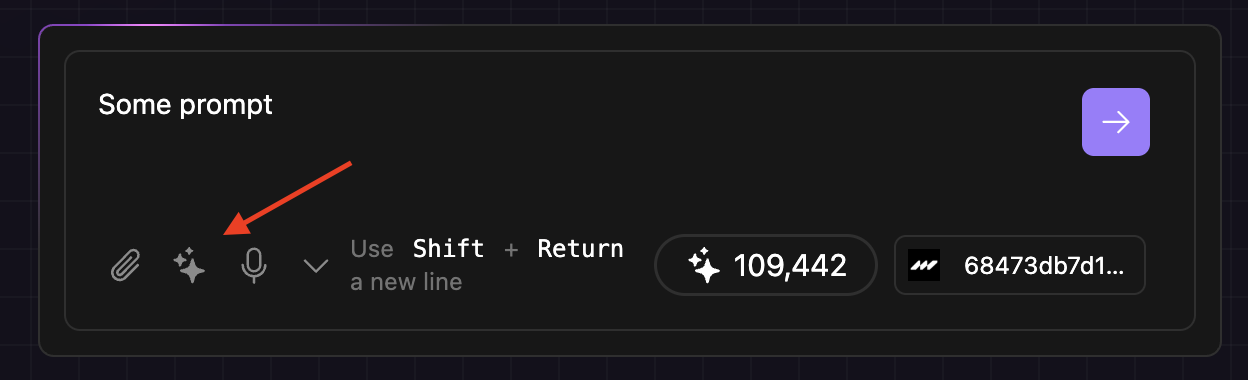 Give it a try and let us know what you think through our [Discord Community](https://discord.com/invite/x4jQNpa3cz).
Let Codestax guide you from spark to shipped. You don’t need to know everything—just start smart and build step by step.
Give it a try and let us know what you think through our [Discord Community](https://discord.com/invite/x4jQNpa3cz).
Let Codestax guide you from spark to shipped. You don’t need to know everything—just start smart and build step by step.